-
E-mail
bjyktj@126.com
-
Phone
13651191826 13717775731
-
Address
38 Laoniuwan West Street, Shahe Town, Changping District, Beijing
Product Categories
- Intelligent digital display measurement and control instrument
- 16 Intelligent Ammeter
- Multi channel integrated transmitter and integrator
- 17 ampere hour meter
- YK-101 series intelligent linear displacement digital display controller
- Intelligent temperature and humidity digital display controller
- 51 Eight Channel Measurement and Control Instrument
- 02 AC current and voltage acquisition system
- 16 channel intelligent inspection device
- 18 hour voltage meter
Beijing Yukotaiji Electronics Co., Ltd


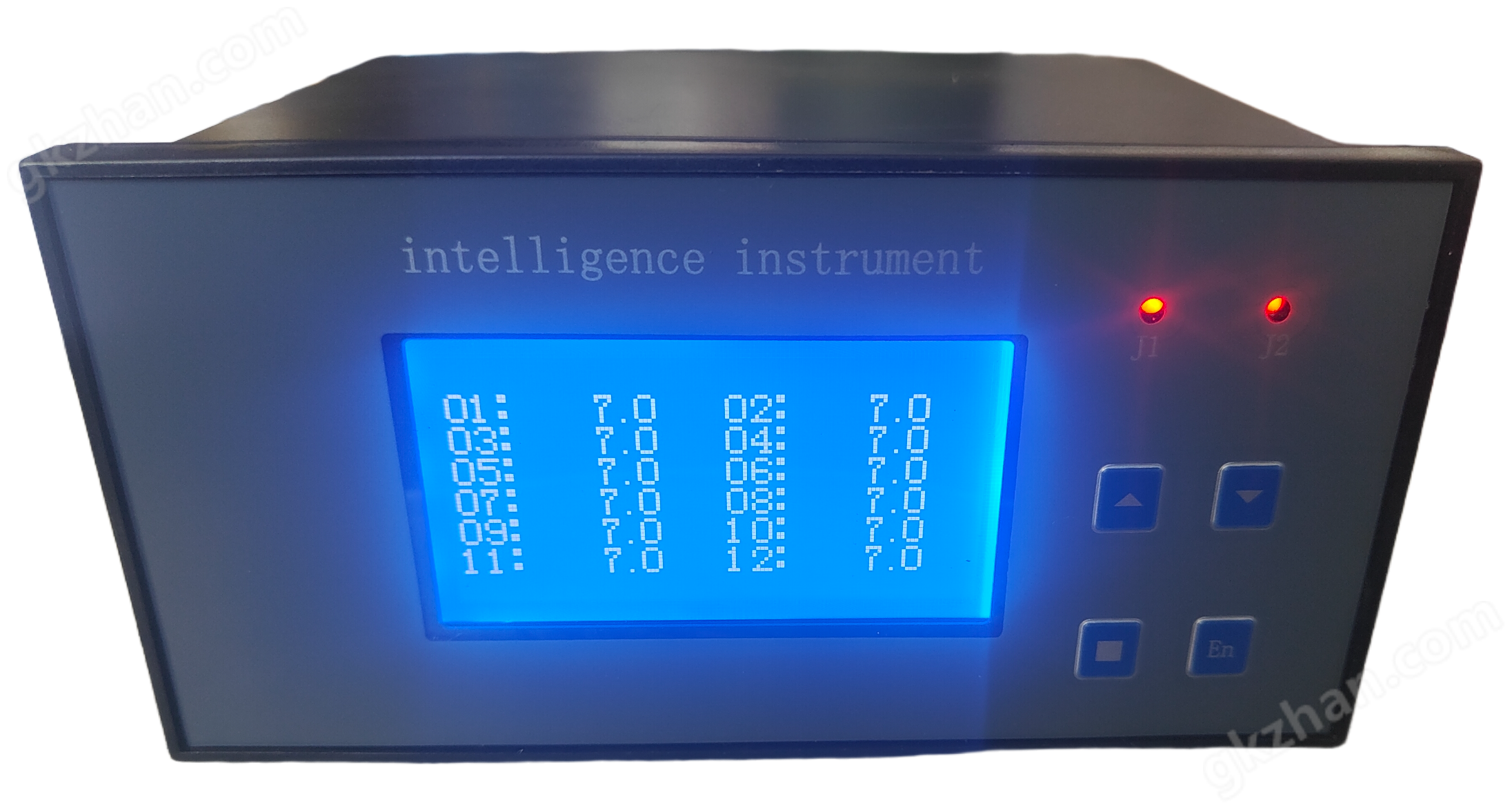
Intelligent wall mounted temperature and humidity alarm
NegotiableUpdate on 01/22
- Model
- Nature of the Manufacturer
- Producers
- Product Category
- Place of Origin
Overview
Widely used in agricultural greenhouses, computer room environment temperature and humidity monitoring, HVAC, building automation, instrument medical food and other industries, workshop warehouse temperature and humidity monitoring, hospital archives and museums
Product Details
1、 Brief introduction:
Intelligent temperature and humidity alarm is a small temperature and humidity alarm that integrates data collection and control. Applied to the collection, detection, and monitoring of temperature and humidity sensor networks. The intelligent temperature and humidity controller is a temperature and humidity monitor specially developed for the fields of computer rooms, agriculture, forestry planting, and animal husbandry. This controller combines computer rooms, agriculture, and animal husbandry The characteristics of agriculture and forestry planting fields have adopted computer technology and advanced digital temperature sensor technology, overcoming the traditional analog temperature Sensors (such as thermistors, platinum resistors, etc.) have serious defects such as instability, large errors, susceptibility to interference, and the need for regular calibration. This instrument has stable measurement data, high accuracy, and strong anti-interference ability. It has broad application prospects in fields such as computer rooms, agricultural greenhouses, grain depots, forestry, and flower farming.
widely used in
·Agricultural greenhouse
·Monitoring of temperature and humidity in the computer room environment
·HVAC, Building Automation
·Instrument, medical, food and other industries
·Temperature and humidity monitoring of workshop warehouse
·Hospital Archives Museum
2、 Technical parameters:
Power supply:12VDCor5VDCSensing element: * Digital temperature and humidity sensor
Moisture measurement range:0~100%RH
Temperature measurement range: Integrated:0~+60℃
Split body:-40~+120℃(Probe section)
precision The humidity can reach±2.0%RHtemperature±0.3℃(25℃)
3、 Temperature and humidity selection:
type score |
say bright |
|
|||||
YK-34 |
|
Intelligent temperature and humidity controller |
|
||||
Product Category Code |
B |
|
wall-mounted |
|
|||
G |
|
pipeline-style |
|
||||
controlled output |
|
T1~T2 |
Temperature relay control1~2a |
|
|||
|
H1~H2 |
Humidity relay control1~2a |
|
||||
|
FM |
buzzer alarm |
|
||||
|
R |
|
serial communicationRS232 |
||||
S |
|
serial communicationRS485 |
|||||
Power supply for transmitter distribution |
V5 |
DC5V |
|||||
V12 |
DC12V |
||||||
4、 Terminal wiring
Wiring definition1Power supplyDC24V:red+, Black-.
2The4-20mATransmission output: brown temperature+, 白色湿度+The Blue Public-.
3Relay output: green upper limit (temperature), yellow lower limit (humidity).
5、 Operating instructions
SET- Parameter setting key, used to store the new set value of the parameter and enter the next set parameter when in the setting state.
▲ - Set value increase key, used to increase the numerical value in the set state. In working mode, press this key to silence the buzzer.
▼ - Set value increase key, used to decrease the value when in the set state. In working mode, press this key to silence the buzzer.
The parameter settings are as follows:
hold downSETThe key remains unchanged1In seconds, a prompt appears:cd-, corresponding value:800Use the ▲ or ▼ keys to800Set as808,press againSETThe key only enters the parameter setting state, and entering other values is invalid to prevent non-technical personnel from misoperation. After setting a parameter, pressSETPress the key to set the next parameter.
(1)appearAdrWhen setting the communication address and range1~99.
(2)appearbdThe baud rate and range of the communication instrument1200~9600.
(3)appearLbtime,Digital filtering parameters, set within the range of0~20.LbThe larger the value, the more stable the measurement, but the slower the response. Generally, when the measured value is subjected to significant interference, it can gradually increaseLbAdjust the values so that the fluctuation between measured values is less than2~5One word. When conducting metrological calibration of instruments in the laboratory, it is necessary toLbset to0or1To improve response speed.
(4)AppearingtHWhen setting the temperature upper limit alarm value (default)30).
(5)AppearingthWhen setting the temperature upper limit alarm reset value (default)29.9).
(6)AppearingtLWhen setting the temperature lower limit alarm value (default)10).
(7)AppearingtlWhen setting the temperature lower limit alarm reset value (default)10.1).
(8)Appearingt0When setting the temperature zero correction value (default)0)The corrected display value=Original display value+ t0Value.
(9)AppearingtFSet the temperature full-scale correction coefficient (default)1)The corrected display value=Original display value ×tFValue.
(10)AppearingrHWhen setting the humidity upper limit alarm value (default)70).
(11)AppearingrhWhen setting the humidity upper limit alarm reset value (default)69).
(12)AppearingrLWhen setting the humidity lower limit alarm value (default)30).
(13)AppearingrlWhen setting the humidity lower limit alarm reset value (default)31).
(14)Appearingr0When setting the humidity zero correction value (default)0)The corrected display value=Original display value+ r0Value.
(15)AppearingrFWhen setting the humidity saturation correction factor (default)1)The corrected display value=Original display value ×rFValue.
(16)appearbsLAt this time, the temperature corresponds to the lower limit of the transmission output.
(17)appearbsHAt this time, the temperature corresponds to the upper limit of the transmission output.
(18)AppearingCJWhen setting the alarm, the linkage mode of the relay is selected for temperature or humidity shared upper limit alarm and temperature or humidity shared lower limit alarmHL, used for temperature independent upper or lower limit alarm, humidity independent upper or lower limit alarm selectiontr.
Parameter settings completed, displayEndExit the setting state and enter the measurement state.
6、 Alarm instructions
① Set asOFFWhen the temperature upper limit exceeds the limit and an alarm is triggeredJ1The light is on, and when the humidity upper limit exceeds the limit, an alarm is triggeredJ1The light is on, and at the same time,J1The normally closed contact of the alarm relay(A pair of red wires in the wiring)From open to closed.
When the lower temperature limit exceeds the alarmJ2The light is on, and when the humidity lower limit exceeds the limit, an alarm is triggeredJ2The light is on, and at the same time,J2The normally closed contact of the alarm relay(A pair of black wires in the wiring)From open to closed.
②Set asOnWhen the upper temperature limit exceeds the alarm or the lower temperature limit exceeds the alarmJ1The light is on,J1The relay is closed.
When the upper humidity limit exceeds the alarm or the lower humidity limit exceeds the alarmJ2The light is on,J2The relay is closed.
After the alarm is triggered, the buzzer will beep, and pressing the ▲ or ▼ keys will silence it.
7Communication Instructions
This instrument can be equipped separatelyRS232TheRS485Interface, directly communicating with the computer,RS485Standard communication distance1.5kmMultiple instruments can be attached.RS232Standard communication distance15mOnly one instrument can be attached.RS232interfaceTXDTheRXDTheGNDConnect the computer serial ports separately2、3、5Pin. The data format is1A starting position8One data bit, no checksum1A stop position. To avoid communication conflicts, the instruments are all in listening mode. The computer sends a command to a certain instrument at a specified address, and then waits for a period of time for the instrument to respond. After the instrument receives the correct command, it sends out the data. After sending, the instrument is in listening mode again. In the same system, instrument addresses cannot be the same, and baud rates must be consistent.
Instrument adopts standardModbus-rtuCommunication protocol standardModbus-rtuCommunication protocol, supports03、06Function number. The equipment to be selected when using configuration software ismodicon(*Kang)ofPLC,Modbus-RTUAddress type, data is integer type16Bit, using the Kingview register from40x01or4x000At the beginning, other configuration software may be3x001or3x000Start. The communication is an integer, and users need to handle the decimal places according to the actual situation. Communication transmission data is signed integer data, and it is recommended to define signed integer data for user programming. When the data is greater than0X8000When retrieving data, reverse adding is necessary1The actual value that is a negative number, for example, communication transmission data is0XFFFFThe corresponding data value is-1For long integer data such as cumulants, the data value=High position x65536+low positionDuring configuration, users can also choose the data type to be a long integer(long)The system automatically calculates the cumulative amount.
Command format sent by the upper computer: It is recommended that the amount of data read at once should not exceed16a:address01;function number03;Starting address high bit00;Low order starting address00;Read the high bits of data00;Read low order of data quantity03; CRC16high position05; CRC16
On site measuring instruments return data format: Address01;function number03;byte count06;High numerical value03;Low numerical valueE8;High numerical value03;Low numerical valueE8;High numerical value03;Low numerical valueE8; CRC16High position fromC1; CRC16low position9F;
Write data to instrument and send command format: (Write to register)
address01;function number06;Starting address high bit00;Low order starting address20;Read the high bits of data00;Read low order of data quantity0C; CRC16high position88; CRC16 05;
On site measuring instruments return data format: (same address as sending data format)01;function number06;Starting address high bit00;Low order starting address20;Read the high bits of data00;Read low order of data quantity0C; CRC16high position88; CRC16 05;
Memory correspondence table (please refer to the settings section of the operating instructions for specific meanings)
4001 |
Temperature measurement value |
4011 |
Temperature alarm lower limit reset |
4002 |
Humidity measurement value |
4012 |
Temperature zero point correction |
4003 |
alarm status |
4013 |
Temperature saturation correction |
4004 |
Temperature alarm upper limit |
4014 |
Humidity zero point correction |
4005 |
Temperature alarm upper limit reset |
4015 |
Humidity saturation correction |
4006 |
Temperature alarm lower limit |
4016 |
Alarm action mode |
4007 |
Temperature alarm lower limit reset |
4017 |
address |
4008 |
Humidity alarm upper limit |
4018 |
Baud rate |
4009 |
Humidity alarm upper limit reset |
4019 |
Lower limit of transmission |
4010 |
Humidity alarm lower limit |
4020 |
Transmission upper limit) |


Similar Product Recommend